
Free download · Business continuity
IT Disaster Recovery Plan Template (Free PDF)
A disaster recovery plan small enough to actually exist: one fill-in page of systems, tolerances, backups, and contacts — plus before/during/after checklists you can run under pressure.
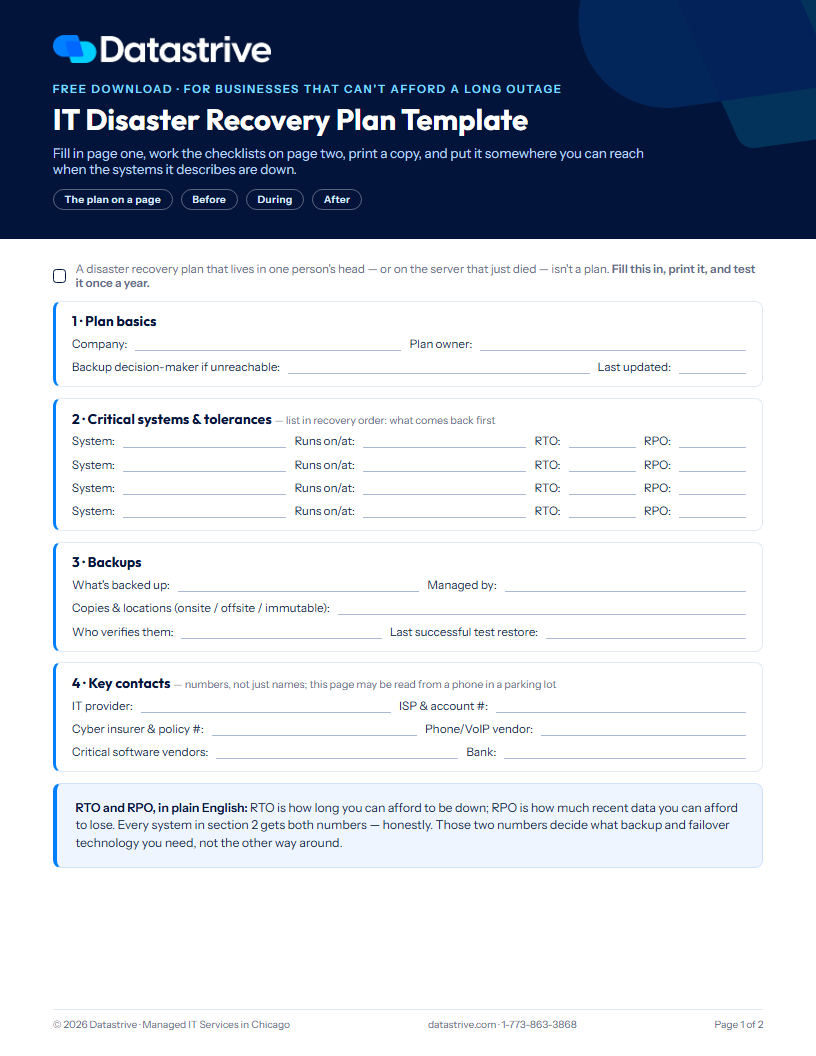
Most DR templates are 40-page documents that never get finished, which means most businesses' real plan is "call someone and hope." This one is deliberately two pages. Page one is the plan — your critical systems in recovery order, the two numbers that matter for each (RTO and RPO), where the backups live, and the phone numbers you'll need. Page two is what to do before, during, and after. Fill it in, print it, and put a copy somewhere you can reach when the systems it describes are down.
We ask for your first name and email, then the PDF downloads right here.
What's inside
The plan on a page — plan owner, critical systems with RTO/RPO in recovery order, backup locations and last test-restore date, key contacts with account numbers
Before — readiness — 3-2-1 backups that survive ransomware, documented restores, the offline copy of the plan, the annual test
During — the first hours — declare and assign roles, stop the bleeding without destroying evidence, communicate on the fallback channel, recover in priority order, log everything
After — closing it out — verify data before declaring victory, root cause, the insurance claim, and folding lessons back into the plan
RTO and RPO in plain English — the two numbers that decide what backup technology you actually need
The template, explained
1. Plan basics
Who owns the plan, who decides when the owner is unreachable, and when it was last updated. A plan without a date is a rumor.
2. Critical systems & tolerances
List systems in recovery order — what comes back first when everything is down. For each: where it runs, your RTO (how long you can afford to be down) and RPO (how much recent data you can afford to lose). Be honest; these two numbers decide what backup and failover technology you need, not the other way around. "Zero downtime, zero data loss" is a budget, not an answer.
3. Backups
What's backed up, who manages it, where the copies live (onsite / offsite / immutable), who verifies them — and the date of the last successful test restore. If that blank makes you uncomfortable, the template has already paid for itself.
4. Key contacts
IT provider, ISP with account number, cyber insurer with policy number, phone vendor, critical software vendors, bank. Numbers, not just names — this page may be read from a phone in a parking lot.
5–7. Before / During / After checklists
The readiness items to do while everything works (3-2-1 backups, documented restores, the communication fallback, the offline copy, the annual test), the first-hours sequence (declare, isolate without wiping, communicate, recover in order, log everything), and the close-out (verify data, root cause, file the claim with your log, update the plan within two weeks).
Pair it with the Incident Response Plan Template — DR brings systems back; IR runs the first hours of a security incident.
Disaster recovery FAQ
What should an IT disaster recovery plan include?
Five things at minimum: who's in charge (with a backup person), your critical systems in recovery order with RTO/RPO for each, where backups live and when a restore was last tested, the contact numbers you'll need (IT, ISP, insurer, vendors, bank), and the step-by-step sequence for the first hours. Everything beyond that is refinement; most businesses fail on these five.
What's the difference between RTO and RPO?
RTO (Recovery Time Objective) is how long you can afford to be down — measured in hours or days. RPO (Recovery Point Objective) is how much recent data you can afford to lose — the gap between your last good backup and the disaster. A dental practice might tolerate a day of downtime (RTO 24h) but almost no lost patient records (RPO 1h); the technology that satisfies those two numbers is very different from one that satisfies the reverse.
What's the difference between disaster recovery and business continuity?
Disaster recovery is the IT half: getting systems and data back. Business continuity is the whole-business half: how you keep serving customers while that happens — alternate workspaces, manual procedures, communications. This template is the DR core with the continuity essentials (communication fallback, roles) built in; a full BCP adds the non-IT operations on top.
How often should we test our disaster recovery plan?
Walk through it (a tabletop) at least annually and after any major change; actually restore from backup at least twice a year. The untested parts are where plans fail — the backup that doesn't restore, the phone list with an ex-employee on it, the plan PDF stored only on the dead server.
Want the numbers filled in by professionals?
Datastrive builds and tests disaster recovery for Chicago-area businesses — backup design with real RTO/RPO targets, documented restores, and an annual test with your name on the report. Free DR review: we'll fill this template in with you and show you the gaps.
Prefer to talk? Call 1-773-863-3868.
More free resources: Incident Response Plan Template · Small Business Cyber Security Checklist · see all free resources
Template for general planning from Datastrive — tailor recovery priorities, tolerances, and procedures to your business. Insurance and regulatory notification obligations vary.