
Free download · Choosing an MSP
Choosing an MSP: The Due-Diligence Checklist (Free PDF)
What to ask a managed IT provider before you sign — the proof to demand, the contract terms that matter, and the red flags that predict a bad year.
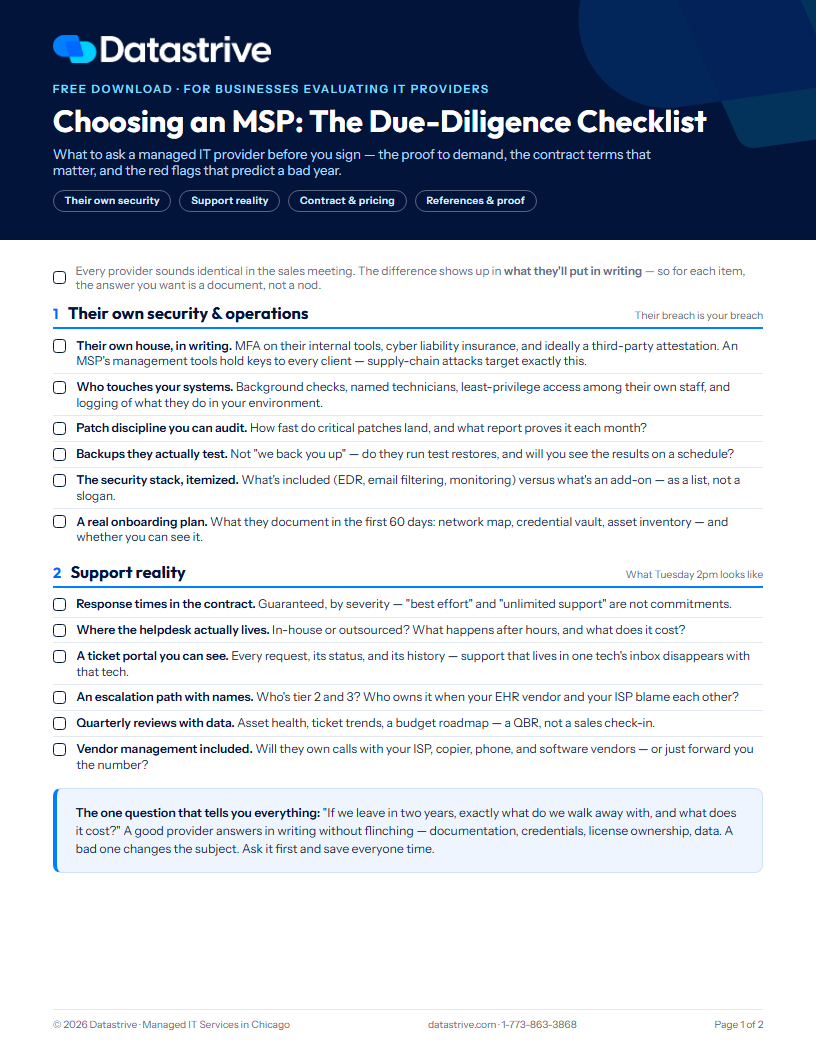
Every IT provider sounds identical in the sales meeting: proactive, responsive, "like having your own IT department." The difference between a great MSP and a regrettable one shows up in what they'll put in writing — response times, exclusions, exit terms, and proof of their own security. So this checklist has one rule: for every item, the answer you want is a document, not a nod.
Yes, we're an MSP publishing a guide on vetting MSPs. That's rather the point — we wrote the list we'd want to be judged by, and you're welcome to use it on us.
We ask for your first name and email, then the PDF downloads right here.
What's inside
Their own security & operations — MFA and insurance on their tools, who touches your systems, patch proof, tested backups, the 60-day onboarding plan
Support reality — contractual response times, where the helpdesk lives, ticket visibility, escalation paths, QBRs with real data
Contract & pricing — the exclusion list, per-user vs per-device math, exit terms, the offboarding guarantee, who owns your tenant and licenses
References & proof — what to actually ask references, tenure numbers, sample reports, and the assessment gut-check
Five red flags that predict a bad year
The checklist
1. Their own security & operations — their breach is your breach
Their own house, in writing. MFA on their internal tools, cyber liability insurance, and ideally a third-party attestation. An MSP's management tools hold keys to every client — supply-chain attacks target exactly this.
Who touches your systems. Background checks, named technicians, least-privilege access among their own staff, and logging of what they do in your environment.
Patch discipline you can audit. How fast do critical patches land, and what report proves it each month?
Backups they actually test. Not "we back you up" — do they run test restores, and will you see the results on a schedule?
The security stack, itemized. What's included (EDR, email filtering, monitoring) versus what's an add-on — as a list, not a slogan.
A real onboarding plan. What they document in the first 60 days: network map, credential vault, asset inventory — and whether you can see it.
2. Support reality — what Tuesday 2pm looks like
Response times in the contract. Guaranteed, by severity — "best effort" and "unlimited support" are not commitments.
Where the helpdesk actually lives. In-house or outsourced? What happens after hours, and what does it cost?
A ticket portal you can see. Every request, its status, and its history — support that lives in one tech's inbox disappears with that tech.
An escalation path with names. Who's tier 2 and 3? Who owns it when your software vendor and your ISP blame each other?
Quarterly reviews with data. Asset health, ticket trends, a budget roadmap — a QBR, not a sales check-in.
Vendor management included. Will they own calls with your ISP, copier, phone, and software vendors — or just forward you the number?
The one question that tells you everything: "If we leave in two years, exactly what do we walk away with, and what does it cost?" A good provider answers in writing without flinching — documentation, credentials, license ownership, data. A bad one changes the subject. Ask it first and save everyone time.
3. Contract & pricing — where surprises hide
The exclusion list, in writing. What "all-inclusive" excludes — projects, after-hours, on-site visits, hardware. Surprises live here, not in the base rate.
Per-user vs per-device, and what growth costs. How the bill moves when you hire five people or close an office.
Term, renewal, and exit. Auto-renewal windows, notice periods, early-termination math — read it before you need it.
An offboarding guarantee in the contract. If you leave: your documentation, passwords, and data handed over, promptly and without ransom. The #1 hostage scenario in this industry.
Who owns what. The Microsoft 365 tenant, the domain registrar, the firewall, the licenses — in whose name? "Theirs" means leverage later.
Certificates of insurance. Errors & omissions and cyber liability, with limits that fit your size — ask for the certificates, not assurances.
4. References & proof — trust the evidence
References your size and industry — called, not collected. Ask each one: "What went wrong, and how was it handled?" Every provider has a bad week; the handling is the data.
Tenure numbers. Average client tenure and technician turnover — both predict your experience better than any demo.
A real (redacted) sample report. Ask to see an actual QBR or monthly report from a current client — polish here reflects discipline everywhere.
Their own continuity. Team depth, documented procedures, coverage when someone's on vacation — or is the whole company one brilliant, exhausted person?
Local when it matters. Response time for a dead switch is measured in drive time — confirm an on-site presence that matches your geography.
The assessment gut-check. Did they ask what your business does and where it's going — or just count computers and quote? You're hiring judgment, not headcount.
Five red flags that predict a bad year
1. No ticket portal — support lives in one tech's inbox
2. "Unlimited support" with no response times in the contract
3. Your domain, tenant, or licenses registered in their name
4. No proof of their own security — MFA, insurance, tested backups
5. A quote that counted your computers before anyone asked about your business
MSP due-diligence FAQ
What questions should I ask an MSP before signing?
Four categories: proof of their own security (MFA, insurance, tested backups — their breach becomes yours), support specifics in writing (response times by severity, ticket visibility, escalation), contract terms (exclusions, exit, who owns your tenant and licenses), and evidence (references you actually call, tenure numbers, a real sample report). The checklist above covers all 24.
What is due diligence when outsourcing IT?
Verifying — with documents, not conversation — that a provider can be trusted with administrative access to everything you own: their security posture, their processes, their contract terms, and their track record. The irreversible part of hiring an MSP is the access you grant on day one, so the vetting happens before signature.
What should be in a managed services contract?
At minimum: guaranteed response times by severity, an itemized inclusion/exclusion list, term and renewal mechanics, insurance requirements, and an offboarding clause that guarantees return of your documentation, credentials, and data. If the contract is silent on offboarding, that silence is the answer.
How do I switch IT providers without chaos?
Mostly by having chosen well: if your documentation, passwords, tenant, and domain are in your name (or contractually guaranteed to return to you), a transition is a few coordinated weeks. The painful switches are the ones where the departing provider owns the keys — which is why "who owns what" and the offboarding guarantee are on the checklist.
Use this list on us.
Datastrive publishes this checklist because we're glad to be graded on every line of it. Start with our managed IT services pricing guide, then bring your hardest questions to a free assessment — we'll answer all 24 items in writing.
Prefer to talk? Call 1-773-863-3868.
More free resources: Managed IT Services Pricing Guide · Small Business Cyber Security Checklist · see all free resources
Published by Datastrive, a Chicago managed IT services provider — which is to say: we have a horse in this race, and we wrote the list we'd want to be judged by.