
Free download · Office Relocation
Office Move Checklist (Free PDF)
The 12-week relocation timeline — including the technology steps that actually cause move-day disasters, which most moving checklists skip entirely.
Most office move checklists are written by moving companies, so they're thorough about boxes and labels and silent about the thing that actually determines whether you can work on Monday: internet, phones, network, and the order you do them in. This checklist covers the whole move — leases, movers, utilities, address changes — with the technology steps where they belong in the timeline.
The one rule, if you remember nothing else: order internet service first. New circuits take 30–90 days to install. If the internet order isn't placed, your move date isn't real yet.
We ask for your first name and email, then the PDF downloads right here.
What's inside
12+ weeks out — the big levers: internet, lease overlap, the IT walkthrough, movers and the copier vendor
8–4 weeks out — cabling, phone-number porting, seat-by-seat planning, equipment orders, address changes
Move week — verified backups, the change freeze, labeling, and proving the new site works before desks arrive
Move day & the first week — network-first setup, per-seat testing, sweeping the old space, and the punch-list week
The five move mistakes that cause downtime — so you can dodge each one
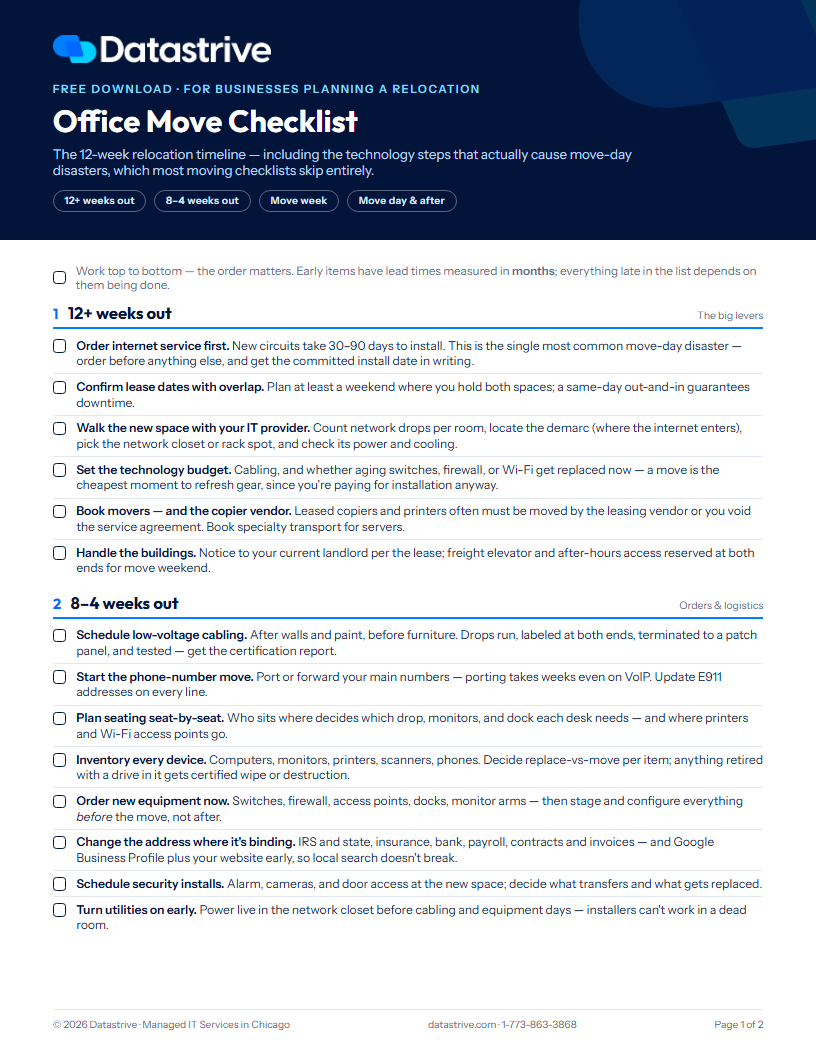
The checklist
1. Twelve-plus weeks out — the big levers
Order internet service first. New circuits take 30–90 days to install. This is the single most common move-day disaster — order before anything else, and get the committed install date in writing.
Confirm lease dates with overlap. Plan at least a weekend where you hold both spaces; a same-day out-and-in guarantees downtime.
Walk the new space with your IT provider. Count network drops per room, locate the demarc (where the internet enters the building), pick the network closet or rack location, and check its power and cooling.
Set the technology budget. Cabling, plus whether aging switches, firewall, or Wi-Fi get replaced now — a move is the cheapest moment to refresh gear, since you're paying for installation anyway.
Book movers — and the copier vendor. Leased copiers and printers often must be moved by the leasing vendor or you void the service agreement. Book specialty transport for servers.
Handle the buildings. Notice to your current landlord per the lease; freight elevator and after-hours access reserved at both ends for move weekend.
2. Eight to four weeks out — orders and logistics
Schedule low-voltage cabling. After walls and paint, before furniture. Drops run, labeled at both ends, terminated to a patch panel, and tested — get the certification report.
Start the phone-number move. Port or forward your main numbers — porting takes weeks even on VoIP. Update E911 addresses on every line.
Plan seating seat-by-seat. Who sits where decides which drop, monitors, and dock each desk needs — and where printers and Wi-Fi access points go.
Inventory every device. Computers, monitors, printers, scanners, phones. Decide replace-vs-move for each; anything retired with a drive in it gets a certified wipe or destruction.
Order new equipment now. Switches, firewall, access points, docks — then stage and configure everything before the move, not after.
Change the address where it's binding. IRS and state, insurance, bank, payroll, contracts and invoices — and Google Business Profile plus your website early, so local search doesn't break.
Schedule security installs. Alarm, cameras, and door access at the new space; decide what transfers and what gets replaced.
Turn utilities on early. Power live in the network closet before cabling and equipment days — installers can't work in a dead room.
3. Move week — cutover prep
Back up everything — and verify it. Servers and key workstations backed up with a test restore before anything is unplugged. Never transport the only copy of your data.
Internet live and tested at the new site. Circuit handed off, firewall configured, Wi-Fi broadcasting — proven days before desks arrive, not discovered on move day.
Label everything. Photo each desk setup before teardown; cables bagged per desk; every box and device tagged with its destination room and seat.
Freeze changes. No new software, no account changes, no "quick upgrades" during move week — one variable at a time.
Communicate the plan. Staff know the last day at the old office and the first day at the new one; clients know about any service gap; number forwarding timed to the hour.
Move servers and network gear separately. Padded, climate-sane transport with a named person responsible — core gear leaves last and arrives first.
4. Move day and the first week — cutover and punch list
Network core first, furniture second. Rack, switches, firewall, and Wi-Fi come online before desks land; then desks in priority order — reception and operations first.
Test every seat against a punch list. Login, internet, printing, phones, shared drives — per desk, signed off. Nobody should discover a dead drop at 8 a.m. Monday.
Sweep the old space. Ceiling access points, wall mounts, closet gear, anything in the plenum — then return the old ISP's equipment so billing stops.
Cancel old services only after cutover is proven. Keep the old circuit as a safety net through the first days, then kill it, the alarm, and utilities — and chase the deposits.
Finish the address trail. Vendor portals, shipping accounts, compliance documents, letterhead — everything the eight-week pass didn't cover.
Run a one-week punch list. Collect every "my second monitor doesn't work" into one list and fix it in one pass, instead of a month of drive-bys.
Medical or dental practice moving? A relocation triggers a fresh HIPAA Security Risk Assessment — grab our HIPAA Compliance Checklist too.
The five move mistakes that cause downtime
1. Internet ordered too late — circuits take 30–90 days
2. No verified backup before gear is unplugged
3. Cabling scheduled after the furniture install
4. Leased copiers moved without the vendor — voiding the agreement
5. Old services cancelled before the new site is proven
Office move FAQ
How far in advance should we plan an office move?
Twelve weeks minimum, and the clock really starts when the internet order is placed — new circuit installs commonly take 30–90 days, longer in buildings that need construction. Everything else in the move can compress; that one can't.
What should we do first when moving offices?
Order internet service at the new address, before the movers, before the furniture, before the paint. Then lock the lease overlap and walk the space with whoever runs your IT so cabling and the network closet get decided while changes are still cheap.
Who should move our servers, computers, and copiers?
Computers and monitors can go with a careful general mover if they're labeled and padded. Servers and network gear should travel separately with a named person responsible. Leased copiers are the trap: many leases require the vendor's own technicians to move the machine, or the service agreement is void — check before move day.
Does the internet really take 30–90 days to install?
Yes, routinely — and that's for buildings that already have the carrier's fiber or coax. If the building needs new construction from the street, it can run longer. This is why it's the first item on the checklist and the first question to ask a prospective landlord.
Moving in the Chicago area?
Datastrive handles office-move IT end to end — circuit orders, cabling, rack and network build, and the move-weekend cutover — so you open Monday morning like nothing happened.
Prefer to talk? Call 1-773-863-3868.
More free resources: HIPAA Compliance Checklist · IT Disaster Recovery Plan Template · see all free resources
General planning guidance from Datastrive — lease, carrier, and vendor terms vary, so confirm dates and obligations against your own contracts.