
Free download · Cybersecurity
Small Business Cyber Security Checklist (Free PDF)
The 24 defenses that stop the attacks small companies actually get hit with — ranked by impact, in plain English.
Here's the honest version of the threat: most attacks on small businesses aren't targeted. They're automated — password-stuffing bots, mass phishing, scanners hunting for unpatched machines — and they harvest whoever left a door open. That's good news, because it means you don't need an enterprise security budget. You need the basics, done completely, in the right order.
That's what this checklist is. Four sections, 24 items, ranked by impact. Finish section one and you've closed the doors most attacks try. And if you carry cyber insurance (or want to), section one is nearly identical to what the application asks — insurers read claims data for a living.
We ask for your first name and email, then the PDF downloads right here. The assessment is free too.
What's inside
The non-negotiables — MFA, a password manager, updates, managed protection, ransomware-proof backups, admin separation
Network & devices — firewall, guest Wi-Fi, laptop encryption, screen locks, inventory, safe disposal
Email & people — phishing training that works, verifying money moves by phone, spoofing protection, same-day offboarding
Be ready anyway — the one-page incident plan, insurance that will actually pay, alerts a human sees, your legal duties
The five breaches we actually see at small businesses
Medical or dental practice? Start with the HIPAA Compliance Checklist instead — it covers these controls in compliance language.
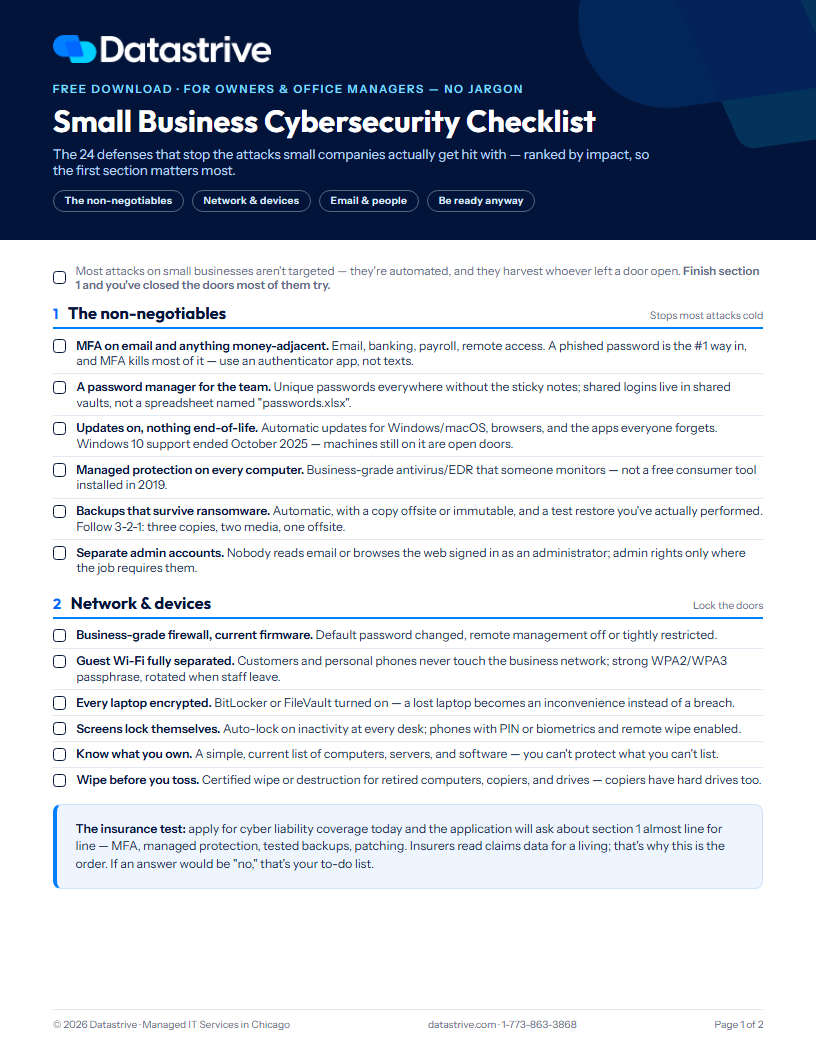
The checklist
1. The non-negotiables — stops most attacks cold
MFA on email and anything money-adjacent. Email, banking, payroll, remote access. A phished password is the #1 way in, and MFA kills most of it — use an authenticator app, not texts.
A password manager for the team. Unique passwords everywhere without the sticky notes; shared logins live in shared vaults, not a spreadsheet named "passwords.xlsx".
Updates on, nothing end-of-life. Automatic updates for Windows/macOS, browsers, and the apps everyone forgets. Windows 10 support ended October 2025 — machines still on it are open doors.
Managed protection on every computer. Business-grade antivirus/EDR that someone monitors — not a free consumer tool installed in 2019.
Backups that survive ransomware. Automatic, with a copy offsite or immutable, and a test restore you've actually performed. Follow 3-2-1: three copies, two media, one offsite.
Separate admin accounts. Nobody reads email or browses the web signed in as an administrator; admin rights only where the job requires them.
The insurance test: apply for cyber liability coverage today and the application will ask about this section almost line for line — MFA, managed protection, tested backups, patching. If an answer would be "no," that's your to-do list.
2. Network & devices — lock the doors
Business-grade firewall, current firmware. Default password changed, remote management off or tightly restricted.
Guest Wi-Fi fully separated. Customers and personal phones never touch the business network; strong WPA2/WPA3 passphrase, rotated when staff leave.
Every laptop encrypted. BitLocker or FileVault turned on — a lost laptop becomes an inconvenience instead of a breach.
Screens lock themselves. Auto-lock on inactivity at every desk; phones with PIN or biometrics and remote wipe enabled.
Know what you own. A simple, current list of computers, servers, and software — you can't protect what you can't list.
Wipe before you toss. Certified wipe or destruction for retired computers, copiers, and drives — copiers have hard drives too.
3. Email & people — where attacks actually land
Train the team on phishing — briefly, often. A ten-minute quarterly refresher with real examples beats an annual lecture nobody remembers.
Verify money moves by phone. Any change to payment details, any urgent wire request — call a known number first. Fake-invoice fraud drains more small-business money than ransomware.
Tag external email. A banner on outside mail makes a spoofed "CEO" message look wrong at a glance.
Stop criminals sending as you. SPF, DKIM, and DMARC configured on your domain — our email security service handles all three.
Least access by default. New hires get what the role needs, not everything; access reviewed when roles change.
Offboard the same day. A departing employee's email, apps, and door codes end on their last day — and someone checks for forwarding rules they left behind.
4. Be ready anyway — when one gets through
A one-page incident plan. Who to call — IT, insurer, bank, attorney — in what order, printed somewhere reachable when email is down.
Cyber insurance that will actually pay. Coverage in force, and the controls the application promised genuinely in place — a wrong answer on the application is a denied claim.
Alerts a human sees. Failed login storms, new mailbox rules, disabled antivirus — somebody gets notified, and it isn't nobody.
An annual walk-through. Run this list once a year and after big changes — new office, new software, new bank.
Check the people holding your keys. Your IT provider, accountant, and software vendors: do they use MFA? Their breach becomes your breach.
Know your notification duties. Illinois' breach law (PIPA) — plus HIPAA or FTC Safeguards if you're in healthcare, finance, or tax work.
The five breaches we actually see at small businesses
1. Phished email password, no MFA — then invoice fraud sent from the real mailbox
2. Payment details changed by email, and nobody called to verify
3. Ransomware through an unpatched machine — and backups that didn't survive it
4. An ex-employee's account still active months later
5. A lost laptop that wasn't encrypted
Small business security FAQ
What cybersecurity does a small business actually need?
Six things cover most of the risk: MFA on email and financial accounts, a password manager, automatic updates with no end-of-life systems, monitored endpoint protection, backups that survive ransomware, and separate admin accounts. That's section one of the checklist — everything else builds on it.
Do small businesses really get targeted by hackers?
Mostly they get caught rather than targeted. The bulk of attacks are automated — credential-stuffing, mass phishing, scanners probing for unpatched systems — and automation doesn't care about company size. A 10-person firm with no MFA is an easier payday than a hardened enterprise, which is exactly how the attackers' economics work.
How much does small business cybersecurity cost?
The core controls are cheap relative to what they prevent: password managers and MFA cost a few dollars per user monthly, managed endpoint protection and backup are modest per-device subscriptions, and most of section one is configuration, not purchases. The expensive version of cybersecurity is the aftermath — downtime, incident response, notification duties, and insurance claims that get denied because the application overstated your controls.
What is the 3-2-1 backup rule?
Three copies of your data, on two different types of media, with one copy offsite (and ideally immutable — unchangeable even by ransomware with admin credentials). The part everyone skips: a test restore. A backup you've never restored from is a hope, not a plan.
What do cyber insurance companies require?
Nearly every carrier now asks for MFA (especially on email and remote access), endpoint detection and response, tested backups, patching discipline, and some security awareness training. Answers on the application are warranties — if a claim investigation finds the controls weren't real, the claim can be denied. Treat the application as a checklist, not paperwork.
Not sure where you stand?
Datastrive runs free security assessments for Chicago-area small businesses — part of our cybersecurity services. We walk this exact list against your setup and hand you the findings in plain English, whether or not we work together.
Prefer to talk? Call 1-773-863-3868.
More free resources: Office 365 Security Checklist · HIPAA Compliance Checklist · WISP Template · see all free resources
General security guidance from Datastrive. Regulatory obligations (HIPAA, FTC Safeguards, state breach-notification laws) vary by industry and state — confirm yours with your attorney or compliance advisor.